

OnGuard Lone Worker · HR & people teams
Lone worker safety
for HR teams.
Your roster changed. Did your safety plan?
Connect the people working alone with the people ready to help—and keep a clear record for follow-up.
From everyday check-ins to coordinated response, see how OnGuard can support your team on the phones they already carry.
For businesses with 15+ lone workers. Your free 30 days start after setup and training. No commitment to continue.
The administration
One change.
More places to check.
A shift moves. A colleague covers. Someone cancels. Every change that lives in more than one system has to be entered more than once.
The roster
Who is working, and when?
The safety schedule
When should monitoring apply?
The team handover
Who needs to know about the change?
The starting point
Keep the roster
as your starting point.
Explore a one-way API connection from your scheduling system into OnGuard. We’ll review whether your existing roster can supply the dates and times needed for monitoring.
Illustrative roster—not a connected scheduling system
| Worker | Planned shift | |
|---|---|---|
| Maya Chen | 09:00 - 13:00 | Changed |
| Alex Morgan | 10:00 - 14:00 | |
| Jordan Lee | 12:00 - 16:00 |
Changed shift
Discuss passing revised start and end times.
Cancelled shift
Plan how cancelled shifts should be handled.
Someone else covers
Confirm how monitoring follows the person covering.
Scheduling integrations are scoped with each organization. Availability, supported changes and monitoring behavior must be confirmed before setup; your scheduling system is not connected automatically.
The check-in
Scheduled to work.
Did she check in?
A roster entry and a recorded check-in answer different questions. OnGuard's Life Check confirms the worker is safe, and each check-in resets her timer.
The plan
09:00 - 13:00
Maya's revised shift.
Recorded activity
Life Check
Each check-in resets her timer.
The response
Who was called?
What happens next?
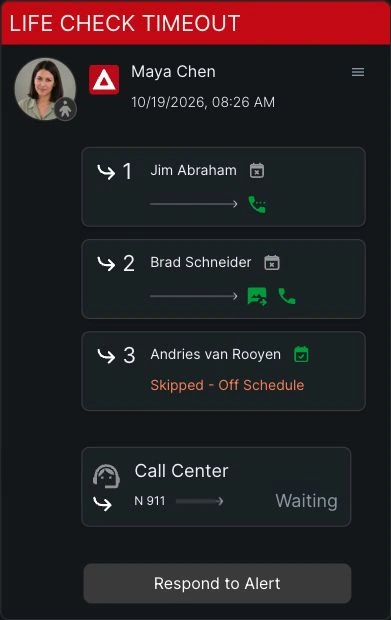
A missed Life Check starts the configured response process. See which contacts are being called, which are queued, and when a contact is skipped because they are off schedule.
Your response plan
The contacts and Call Down order you configure.
Optional escalation
Call Center support, where configured and available.
A responder can connect with the worker while the alert remains active. Clearing the alert is a separate action, recorded for follow-up.
The timeline
A clear record
for follow-up.
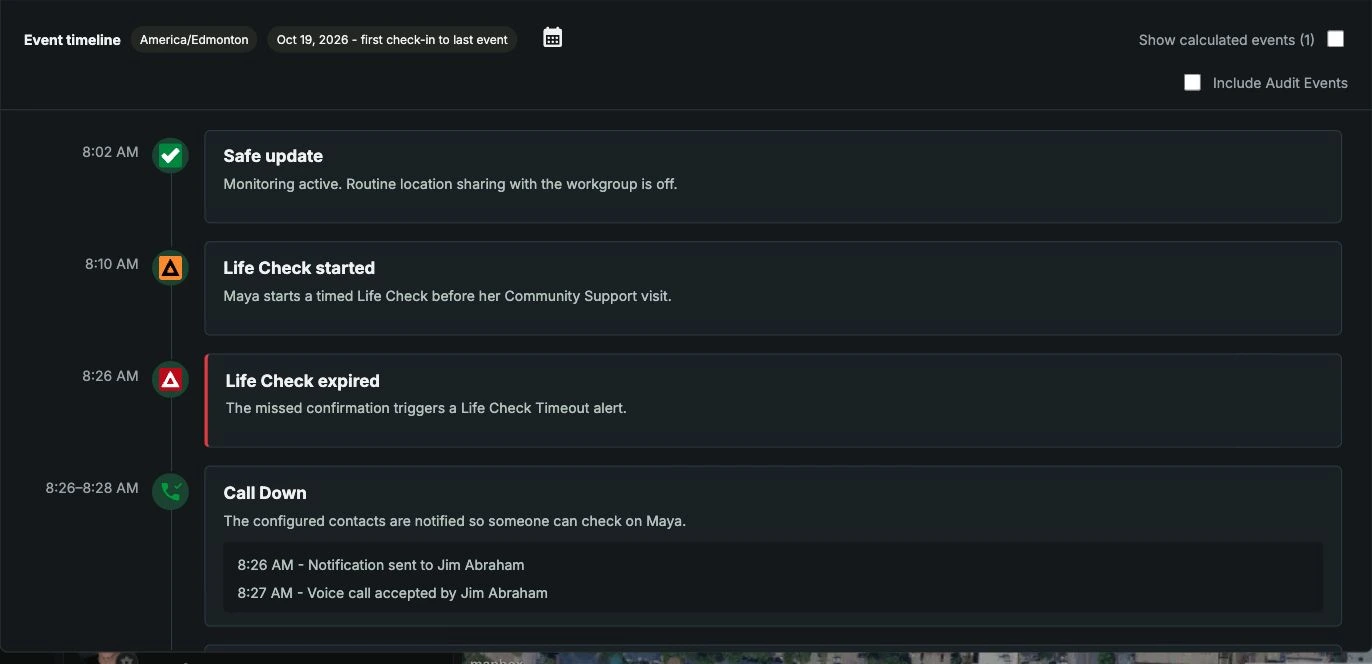
The Timeline Report brings check-ins, alerts, notifications and Call Down events together. In this example, a contact accepts the call and Maya later clears her Life Check Timeout alert by confirming she is safe.
For HR decisions
The questions HR is asked.
Where OnGuard helps.
Duty of care
Who is monitored, and when?
Use the monitoring schedule configured for your team, and confirm that it reflects the shifts people actually work.
Time
How often is the same change entered?
Start from the roster and explore carrying changes into OnGuard instead of re-entering them.
Response
Who answers, and in what order?
You set the Call Down order, with the optional Call Center as a fail-safe.
Follow-up
Can you show what happened?
The Timeline Report records each event, who responded and who cleared the alert.
Rollout
Will staff accept it?
Workers use the phones they already carry. Read our union-friendly rollout guide.
Evidence
How do we decide?
Run a free 30-day team pilot with 15 or more workers on real shifts before you commit.
Your workflow
What schedules
your team?
Bring your scheduling and reporting questions. Tell us about:
Your scheduling system
The tools your team already uses.
Your changing shifts
The updates you currently enter more than once.
Your safety protocols
Who should be monitored, and when.
Questions from HR
Frequently asked questions
Does OnGuard connect to our scheduling system?
Scheduling integration is something we explore with each team. Tell us which scheduling system you use and how your shifts change, and we will discuss a one-way connection that carries roster changes into OnGuard monitoring.
What happens when a worker misses a check-in?
When a Life Check times out, OnGuard calls the worker for a welfare check. If they do not answer, your response team is notified by text and email and the Call Down order begins. If your team is unavailable and no one accepts, the alert can escalate to our optional Call Center service, where configured and available.
Who responds to an alert?
The contacts you configure, called in the order you set. When someone accepts, further calls stop and they connect to the worker. The optional Call Center service is a fail-safe if your team is unavailable and no one accepts.
Does accepting a call clear the alert?
No. Accepting a call and clearing an alert are separate actions. The alert stays active until the worker returns to Safe or an authorized dispatcher clears it.
What record do we get after an incident?
The Timeline Report brings the alert, the notifications, the Call Down and responder events, and who cleared the alert together in one record for follow-up and compliance review.
How can our team try OnGuard?
Teams with 15 or more lone workers can apply for a free 30-day team pilot, including the optional Call Center service where available.
30-day team pilot
See it on your real shifts.
Run OnGuard free for 30 days with 15 or more lone workers. We’ll help configure your pilot, onboard your workers and contacts, and provide full team training.
Your 30 days begin after setup and training, with progress meetings on days 7 and 14 and a final review. No commitment to continue. Optional Call Center service is subject to availability.
Fewer than 15 lone workers? Talk to our team. Scheduling integration questions? Discuss scheduling with our team